
Google Ads Remarketing: Bring Back Visitors Who Didn't Buy
Ads for people who visited your site or bought before, judged on revenue.
Our remarketing service brings back people who already visited your site or bought from you: Google Ads shows them your ads again, on the sites and apps they use next. Many buyers don't buy on the first visit. In our Shoe IT case, a buyer of premium footwear made more than ten visits on average before buying. So we set up the audiences and campaigns, run them, and judge them on revenue (ROAS, revenue per dollar of ad spend), not on clicks. How the weekly work, the approvals and the monthly report run is described on the Google Ads management page, where our AI advertising agent prepares each week's changes.
Who you can bring back: audience segments
Google's help pages call it remarketing, and many marketers call the same thing retargeting. It is one idea: show ads again to people who already know you.
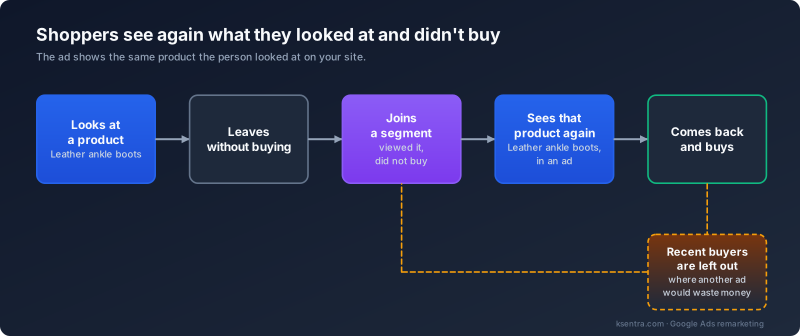
The groups we can build, depending on what your site and account collect:
- people who visited your site, once the Google tag is on it;
- people who viewed a product or left a cart, from your Google tag or Google Analytics;
- people who watched your videos on YouTube;
- users of your app;
- your customer list, where Google's policies allow it.
Google sets the eligibility for customer lists. An account with enough history and spend with Google can target the list, and any account that follows Google's policies can use it to keep existing customers out of campaigns and to see how that group performs.
Beyond people who already know you, Demand Gen campaigns can also reach lookalike audiences, people similar to your best customers.
Remarketing ads in Google Ads start once an audience reaches Google's minimum size. At the time of writing that is 100 active users in the last 30 days on Display, Search and YouTube, so the site needs steady traffic.
Where the ads show
Remarketing ads can run in four places:
- Display, Google's network of partner sites and apps;
- YouTube;
- Search, where an audience is added to a search campaign;
- Demand Gen campaigns, which include YouTube, Discover (the feed in the Google app), Gmail and Display.
If you sell products, dynamic remarketing shows each person the products they viewed. It takes them from your Merchant Center feed, the product data Google reads. For that, dynamic remarketing has to be turned on in Merchant Center and the account linked to Google Ads.
If Performance Max, Google's automated campaign type, runs in your account, we add your remarketing audiences to it as signals, hints about whom to look for. We also limit the overlap between Performance Max and remarketing campaigns, and the report shows which campaign each sale came from.
Keeping remarketing from wasting money
Remarketing can pay again for a customer who has already bought, or who would have come back anyway. So we leave out recent buyers where showing them the same ad again would waste money, and we limit how often one person sees your ads and how long they stay in an audience, where the platform allows it. In the report we show each audience's revenue and cost next to your other campaigns.
What you get
Your visitors, brought back and judged on revenue
Warmer clicks
The ads reach people who have already seen your site, so you pay for clicks from people who know who you are.
The products they viewed
For a store, the ads show each person the products they looked at, taken from your Merchant Center feed.
Repeat sales to the customers you have
Past buyers are an audience too. We can show them new products or a reminder, and we leave them out of campaigns meant for new customers.
Optimized for revenue
We optimize for ROAS by audience, using your revenue data and our own methods. We look at each audience's revenue and cost, and we move the budget toward the audiences that bring more revenue per dollar.
What setup takes
-
1
Consultation
In the free consultation we go through what your site already collects, such as the Google tag, conversions, purchase values and your customer base.
-
2
What we need from you
For businesses based outside Russia, we need access to Google Ads (the account stays yours), the Google tag on your site, Google Analytics with purchase values, and Merchant Center if you want dynamic remarketing.
-
3
Setup
We build the audiences, combine them into groups, set up the campaigns, and exclude recent buyers where showing them ads again would waste money. You approve the plan before anything goes live.
-
4
Audiences build up, then the weekly work
Remarketing ads on Display, Search and YouTube start once an audience reaches Google's minimum size. After that comes the weekly cycle of our Google Ads management service.
Shoe IT: remarketing next to search, contextual and product ads
Shoe IT is a Russian online store of Italian footwear, and we worked with it from 2017 to 2026. A buyer of premium footwear needed more than 10 visits on average before buying (our RoiStat attribution data), so remarketing ran alongside search, contextual and product ads. The case describes the whole project, not remarketing alone.

ArendaYachts: first paying customers from ads while organic search ramped
Since 2021 we have worked on ArendaYachts, a yacht charter business. Its first paying customers came through Yandex Direct and remarketing while its organic search positions ramped.
Frequently asked questions
Get Free ConsultationIs remarketing right for our site?
It fits a site with steady traffic, because Google needs a minimum number of active users in an audience before ads start. It pays most where a purchase takes several visits. We run Google remarketing for businesses based outside Russia, in accounts that stay yours. Google paused ads for advertisers based in Russia in 2022, so for companies based in Russia we run retargeting in Yandex Direct instead.
What do you need from us to start remarketing?
For Google remarketing we need access to Google Ads, the Google tag on your site, Google Analytics with purchase values, and Merchant Center for dynamic remarketing. The account stays yours. Tell us who installs tags, your developer or us.
How soon will remarketing ads start?
Remarketing ads in Google Ads start once the tag is on your site and an audience reaches Google's minimum size, at the time of writing 100 active users in the last 30 days on Display, Search and YouTube. We don't promise a week count, because it depends on how much traffic your site gets.
How do you know remarketing pays?
We read the monthly report by audience, with revenue and cost side by side, and we move the budget using our own methods on your revenue data.
Can you use our customer list?
Yes, we can use your customer list for remarketing in Google Ads. Google sets the eligibility. An account with enough history and spend with Google can target the list, and any account that follows Google's policies can use it to keep existing customers out of campaigns and to see how that group performs.
Won't people find it annoying?
We limit how often one person sees your ads, and we leave out recent buyers.
What is the difference between remarketing and retargeting?
Nothing, in practice. Google's help says remarketing, many marketers say retargeting, and both mean showing ads again to people who already visited your site or bought from you.
Visitors who left without buying?
In a free consultation we check which audiences your site already collects.