
Google Shopping Ads: Setup and Management
Your products with photo and price in Google Shopping, from a feed we check and fix.
Google Shopping ads show your products with a photo and a price in Google search, so shoppers see what you sell before they click. Your catalog can be advertised from one product feed, without building an ad for each item by hand. We set up the campaigns, run them and optimize them for revenue (ROAS, revenue per dollar of ad spend) on your own sales data, with our own methods. The weekly work, a specialist's approval of every change and the monthly report are the same as in Google Ads management, which runs on our AI advertising agent.
What Google Shopping ads are
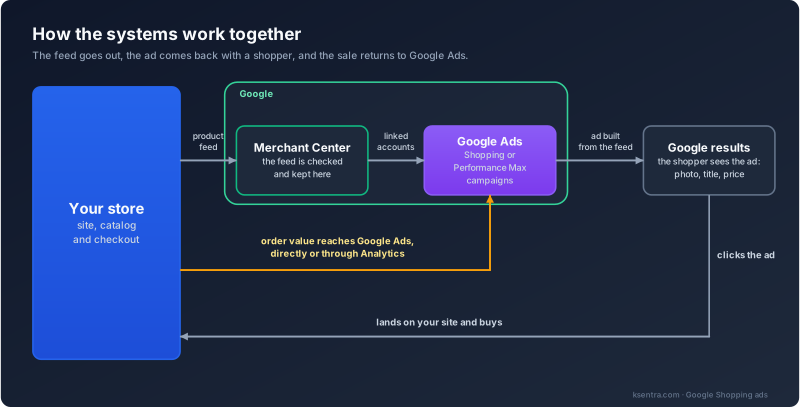
Google Shopping ads run on the product data in Google Merchant Center, the Google tool where your feed lives, linked to your Google Ads account. Performance Max, covered below, runs on the same data. The ad is built from your feed: the photo, the title, the price. So the feed largely decides which searches your products can appear in.
Once the products are live, we can also show people the products they viewed.
Shopping or Performance Max?
We choose the campaign type with you at the start, after looking at the account:
- We use Performance Max, Google's automated campaign type that runs across its channels, when the account already gets steady conversions and tracks the value of each one.
- We use Standard Shopping, the classic Shopping campaign, for a small account, or for a store that wants closer control over which products it pays for.
- With either type, we keep your brand searches apart in the report, so you can see brand demand and new demand separately.
ROAS depends on order values reaching Google Ads, directly or through Google Analytics. If they don't, we set that up first.
What you get
Your catalog in Google Shopping, tied to revenue
The whole catalog in ads
Every product in your feed that passes Google's review can be advertised, without an ad written for each item by hand.
Photo and price before the click
Shoppers see the product and what it costs in the results, so they know what they are clicking on before they arrive.
Ads that follow your stock
Price and availability come from your feed, so the ads can follow your stock as long as the feed is kept current. We check how often it updates.
Optimized for revenue
We optimize for ROAS, revenue per dollar of ad spend, using your revenue data and our own methods. Product groups with different margins get their own targets.
The product feed: what it needs
Each product in the feed carries details such as an ID, a title, a description, a link, an image, a price and its availability, and brand and GTIN where the product has them. We check your products against what Google requires for each type of product. The feed is what Google reads, so its quality decides what you can show.
What we do with it:
- check it in Merchant Center for errors, missing details and products Google disapproves;
- compare the price and availability in the feed with what the product page shows;
- rewrite titles and fix product types and attributes so a product matches the words people search with.
You don't need a perfect feed to start. You need to know who edits it, your developer or your store platform, and we work with them.
What setup takes
-
1
Consultation
In the free consultation we go through your catalog, your margins and your current feed.
-
2
What we need from you
Access to Google Ads and Merchant Center (the accounts stay yours), Google Analytics with purchase values, and the feed or the name of your store platform. If you have no Merchant Center account yet, we set it up with you, and it stays yours.
-
3
Setup
Merchant Center linked to Google Ads, the feed fixed, Shopping or Performance Max set up. You approve the plan before anything goes live.
-
4
Launch, then the weekly work
New products go through Google's review, then the first weeks of data, then our optimization on your revenue, in the weekly cycle of our Google Ads management service.
Shoe IT: product ads from a feed of 1,429 products
From 2017 to 2026 we ran the advertising of Shoe IT, a Russian online store of Italian footwear: search, contextual, product ads and remarketing, with 1,429 products in the feed. On average, a premium buyer there made more than 10 visits before buying (our RoiStat attribution data). The case covers the whole project, not product ads alone.

Frequently asked questions
Get Free ConsultationWho is this for, and do we need a feed?
Online stores that sell products from a catalog. Google Shopping runs on product data in Merchant Center, so you need a feed. Your store platform or your developer produces it, and we check it and fix what is wrong. We run Google Shopping for businesses based outside Russia, in accounts that stay yours. Google paused ads for advertisers based in Russia in 2022, so for companies based in Russia we run product ads in Yandex Direct instead.
What do you need from us to start Shopping ads?
Access to Google Ads and Merchant Center, Google Analytics with purchase values, and the feed or your store platform. Both accounts stay yours. If you have no Merchant Center account yet, we set it up with you.
How soon will we see results from Shopping ads?
New products go through Google's review first, then come the first weeks of data, and only then our optimization on your revenue. We don't promise a week count, because it depends on the size of the catalog and the state of the feed.
Which of my products won't be shown?
Products missing details such as a price, a picture or availability, and products Google disapproves. Merchant Center lists the status of each product. We fix what the feed can fix and tell you what only your store can change, such as a missing product photo.
Can you show similar projects?
Yes. We ran product ads for Shoe IT, a Russian footwear store, from 2017 to 2026, and the Shoe IT case is linked on this page. We also ran them for Naumi, a women's clothing brand (2017–2018, 867 products in the feed), where revenue doubled year on year, and for Cozy Home, an online store of bedding, home textiles and decor (2017–2019), where the ads were built around seasonal sales with discounts of up to 50–70%. Revenue there grew more than fivefold over the cooperation. Both figures belong to the whole project, with advertising, SEO and analytics working together.
Which should we use, Standard Shopping or Performance Max?
We pick after looking at your account. Performance Max, Google's automated campaign type, fits when conversions come in steadily and order values are tracked. Standard Shopping fits a small account, or a store that wants closer control over which products it pays for. We can run both.
Want your products shown with photo and price?
In a free consultation we look at your feed and your Google Ads account.