
How to Implement AI Agents in a Company: A Step-by-Step Plan from the First Process to Scale
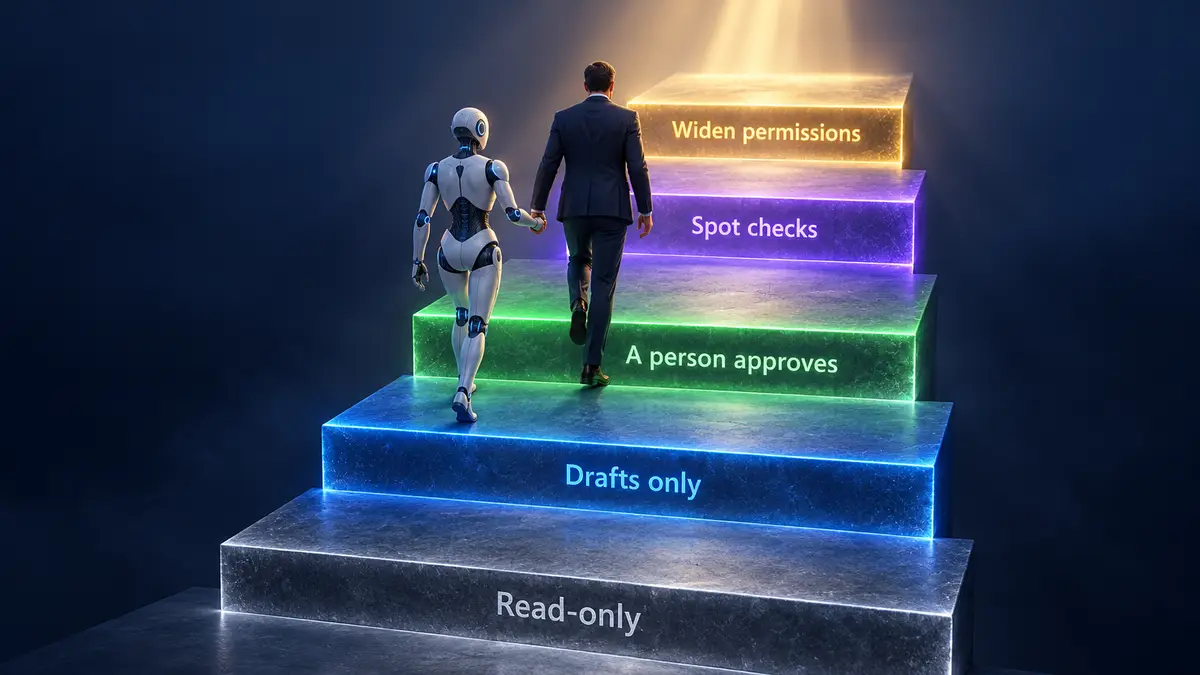
The safest way to implement AI agents is as a ladder of access: you widen the agent's permissions one rung at a time and check every change it makes in the live system, not in its own report. We rolled out our own advertising agent by skipping rungs; this ladder is how we would do it today. Below are the six implementation steps, the access rungs, and the roles: who decides, who acts and who is accountable for errors.
The short version: how to implement an AI agent. Pick the first process and its owner, write the agent a job description and give it access to data at the lowest level that works. Then let it run read-only, move it to a mode where a person approves every action, measure the pilot and widen its permissions one rung at a time.
What you need before you start
- A process written down: steps, rules, exceptions.
- A process owner on the business side.
- Someone in IT who grants access to the system the agent will work in.
- A person who will approve the agent's actions and be accountable for its errors.
If a vendor calls a chatbot an agent, ask one question. Does the system carry out a multi-step process inside your software on its own, choosing each next step from the result of the last one, or does it answer a person turn by turn? We cover the difference in AI agents for business: what they are and how they work.
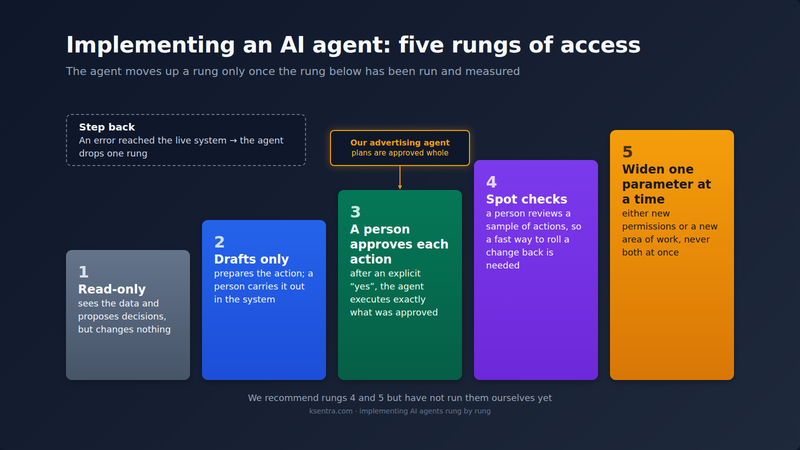
The access ladder. This is our working scheme. The agent moves up a rung only once the rung below has been run and measured.
- Read-only. The agent sees the data and proposes decisions but changes nothing.
- Drafts only. The agent prepares the action; a person carries it out in the system.
- A person approves each action. After an explicit "yes", the agent executes exactly what was approved.
- Spot checks. A person reviews a sample of actions. The rest run without prior approval, so this rung needs a fast way to roll a change back.
- Widen one parameter at a time. The agent gets either new permissions or a new area of work, not both.
Contents
- Step 1. The first process
- Step 2. The agent's job description
- Step 3. Data, access and personal data
- Step 4. Read-only and drafts (rungs 1–2)
- Step 5. Approval and accountability (rung 3)
- Step 6. Pilot review and widening (rungs 4–5)
- Timeline and cost of implementation
- Common mistakes when implementing AI agents
- FAQ
Step 1. The first process
The first process decides what the company learns from the pilot, so choose it on checkable criteria. A good candidate passes five checks:
- Frequency. It runs daily or weekly; otherwise the pilot collects too few cases to draw conclusions.
- Written rules. An employee could explain to a new hire how to decide, and that explanation is already written down.
- A measurable result. It is clear what to count: time per task, error rate, cases handled.
- Cost of an error. An agent's mistake can be caught and fixed before it reaches a customer or money.
- Data. Everything needed to decide already sits in a system the agent can reach.
Don't start with processes where the agent would make decisions with legal consequences or move money directly, where the rules live in one employee's head, or where the process has no owner. Good first candidates are support ticket triage, report drafts and qualifying inbound requests.
Outcome: one named process with an assigned owner.
In our case. Our first process was managing our own Yandex Direct account (Russia's main search advertising platform). It is our money and our product, so testing on ourselves was simplest. The process is high-stakes: a mistake in a bid or budget spends money immediately. For its first three months the agent had no write access at all. For your company's first agent, we recommend a process where mistakes are cheaper.
Step 2. The agent's job description
An agent needs a job description just like a new hire, only stricter. It has four parts: what the agent may read, what it may change, what it never touches, and when it stops and asks a person. The last part matters most. Without a stopping rule, an agent fills a gap with a plausible answer where an employee would have said "I don't know". The process owner signs the job description, and every later error review rests on it: either the agent stepped outside its limits, or the limits were set wrong.
Outcome: a one-page job description: reads, changes, never touches, when it stops.
In our case. Our ads agent's job description, condensed:
- Reads: campaign structure, statistics, and the search queries the ads were shown for.
- Changes: bids, keywords, negative keywords (phrases the ads must not show for), ads and budget. Only in campaigns on a fixed list, and only through a change plan.
- Never touches: campaigns off the list, payments, account settings.
- Stops: before every apply. A person applies the plan.
Step 3. Data, access and personal data
An agent is only as good as the completeness and freshness of its data. Before the pilot, collect the procedures, reference data and examples of past decisions for the chosen process, and remove what is out of date: the agent relies on a current document and a three-year-old one with the same confidence. Name an owner for each source. If a procedure changes and nobody updates the agent's knowledge base, the agent keeps working the old way. If the agent answers from a company knowledge base (an approach called RAG: it searches your documents before answering), the process owner checks what went into the base and who will keep it current.
Grant access on the principle of least privilege. The first rung of the ladder starts here. If the agent only needs to read at first, IT grants read-only access. Put the restriction where it can't be bypassed. If the access key technically allows writes and only the agent's code prevents them, the restriction lives in code, and you should know that up front.
Personal data
If the agent's inputs include names, phone numbers, customer correspondence or employee records, privacy law applies, and the rules depend on where you and your customers are. Before the pilot, answer three questions:
- Where the model runs and where the data is stored. Some jurisdictions restrict storing or transferring personal data outside the country, and some require notifying a regulator first.
- On what basis the vendor processes the data. Handing processing to another company usually needs a contract that lists the data, what is done with it, why, and how it is protected.
- What goes into the requests to the model. Sometimes personal data can be stripped from requests before they are sent, and some of the questions fall away. How many is your lawyer's call.
Ask the vendor to answer these questions in writing and show the answers to your counsel. Our ads example doesn't carry this risk: the agent works only with ad-account data.
Outcome: data and access granted at the lowest level that works, and the personal-data question closed in writing.
In our case. The list of campaigns the agent may work with is fixed in code. If a plan touches a campaign that isn't on the list, the tool refuses before any write. A new campaign is added to the list by hand, as a separate decision.
Step 4. Read-only and drafts (rungs 1–2)
On the first two rungs the agent changes nothing itself. On the read-only rung it looks at the same data as the employee and proposes decisions. On the drafts rung it prepares the whole action and a person carries it out. Compare the agent's proposals with the employee's decisions on the same cases: how often they agreed, where they diverged, and who turned out to be right. Review separately every case where the agent should have stopped and asked but didn't — that is the main risk on the rungs above.
How long this stage lasts depends on the data. Move on once you have enough cases, including unusual ones, and the disagreements have stopped surprising you. The process owner sets the agreement threshold.
Outcome: a read-only or drafts-only period, and a comparison of the agent's proposals with a person's decisions.
In our case. From April to mid-July the agent never saw the ad account: it reasoned over data exports our PPC specialist sent it. On July 14 it got API access to the account. Our code used that access read-only, although the key itself allowed writes. Within the first hour the agent found things no data export had shown — for example, a campaign the plan said was running had been switched off. More in AI agents for business: what they are and how they work. We never ran a textbook shadow mode, with the agent solving the same tasks in parallel with a person.
Step 5. Approval and accountability (rung 3)
On the third rung the agent carries out actions itself, but a person approves each one first. Before moving up, name who approves and write it into the job description from step 2. Whoever clicks "apply" owns the error. Keep an approval log from day one, recording:
- what the agent proposed;
- who approved or rejected it, and why;
- when the change was applied;
- what the system returned.
After every change, check the result in the live system itself.
If people work in the same system, log their manual changes in the same place. The system doesn't store why something changed: a campaign an employee paused and a campaign that broke look the same to the agent. Before raising an alarm when a campaign behaves oddly, the agent or the responsible person asks colleagues whether it was their decision.
Outcome: a named person who approves the agent's actions, and a log of approved changes.
In our case. The agent writes its changes as a plan. The tool checks the plan without sending anything to the platform, a person runs the apply, and the tool executes exactly what was approved and pulls the result back from the account. Plans are approved whole, and the largest one held 138 bids, so ours is a simplified third rung.
There is a weak spot: the PPC specialist sometimes changes campaigns by hand, and those changes bypass the log. Once another of our agents, the one that handles marketing reporting, spotted a campaign that had gone quiet, checked everything it could and handed the question to a person without inventing a cause. The PPC specialist had paused it.
Step 6. Pilot review and widening (rungs 4–5)
Judge the pilot on four measures:
- Agreement between the agent's decisions and the employee's.
- The share of proposals a person rejected.
- Errors caught before they reached the live system, and errors that reached it.
- Time per task, measured the same way before and after, from the task log.
On the spot-check rung a person reviews a sample of actions, say every fifth one or every action above a set amount. On the last rung the agent gets either new permissions or a new area of work. Widen both at once, and when something goes wrong you won't know which change caused it.
Agree in advance when the agent steps back down a rung. The agent drops a rung if an error reached the live system, if agreement with a person's decisions falls, or if the process it runs has changed. The process owner sets the thresholds.
After launch, the process owner reviews the log weekly: the share of rejected proposals, errors that reached the system, and people's manual changes. Check the figures in the agent's report against the system itself.
Outcome: a decision on the pilot: widen, hold, or step back a rung.
In our case. From July 18 to October 2 the agent prepared 38 plans: 34 applied, 3 rejected by the PPC specialist, 1 refused by the platform. Two applied plans were still filed as drafts in our records until recently. At least three errors reached the account. A fresh pull of the ad groups caught one, only the PPC specialist noticed another in the interface, and spend revealed the third: a new ad group launched without negative keywords, and automatic query matching spent money on off-target searches within a day. The PPC specialist's manual changes aren't in these counts. The agent has never gone above the simplified third rung.
Timeline and cost of implementation
AI agent implementation takes as long as climbing the rungs does. Development is only part of it; the rest goes into preparing data and into people approving decisions. Three factors set the length: how ready the data is, how many systems the agent works with, and how fast the company approves its actions.
Instead of a calendar plan, ask the vendor for exit criteria for each rung:
| Rung | What must be true before moving up |
|---|---|
| 1. Read-only | A comparison with the employee's decisions on a large enough sample, unusual cases included |
| 2. Drafts only | Drafts are accepted without rework, and the agent stops where it should |
| 3. Approval of each action | An approval log, a low rejection rate, no errors in the system for an agreed period, a fast way to roll a change back |
| 4. Spot checks | The sample finds no errors for an agreed period, and the log is reviewed every week |
We can't give client rollout timelines yet: we have had no external agent rollouts. The build estimates on our service page cover development only, not the climb through the rungs. Our own dates (data exports from April, read access on July 14, first writes on July 16, the platform's refusal on September 2) come from building the tool for our own account.
The cost to your company has several parts: building and configuring the agent, a monthly retainer for support, model usage if the retainer doesn't cover it, and your staff's time. The last one is often forgotten: the process owner and the approver spend hours on the pilot every week.
Our prices:
- A custom agent for your process: setup $5,000–$20,000+, retainer $1,500–$5,000+/mo. The total depends on the process; we quote the exact price after a consultation.
- A ready-made AI worker for SEO or advertising: from $4,500/mo (SEO) or $4,250/mo (advertising), plus $6,000 setup. The advertising worker is in active development.
A custom agent fits when you are automating a process of your own; a ready-made worker fits when the task matches what it already does. All options are on the AI agents for business page, and we break down what drives development cost in How to build an AI agent for your business. If you'd like to work through your first process with us, talk it over in a consultation.
Calculate payback from the process: what the task costs now (staff time, errors, delays) and what it will cost with the agent, including the retainer and the time spent approving.
Common mistakes when implementing AI agents
Every mistake below is our own, from running the advertising agent.
- Treating passing tests as proof the platform integration works. We modelled the platform's test responses on our own code, and the test stub returned its scripted answer whatever we sent it. All 147 tests passed, and one call to the real platform returned an error. Our tests now also check what we send.
- Mistaking our own check for the platform's approval. On a search campaign, our check let through switching off autotargeting (the platform's automatic query matching) entirely, and the platform refused it at apply. Since then the tool refuses that operation itself, before anything is sent.
- Trusting the reference data over a check in the account. In July the platform's reference data listed a minimum daily budget of ₽300 (rubles). The agent took it as a binding limit, but a budget of about ₽164 a day was accepted without an error. Manual-bid campaigns run on a weekly budget, and the minimum that binds is ₽300 a week.
- Reading a silent report as "nothing there". The agent concluded that negative keywords had never been applied to the campaigns, because its report never requested that field and our change log had none: the PPC specialist had added them by hand. The account held more than a hundred. The list the agent proposed instead would have blocked the queries behind 12 of 32 clicks and 37% of a campaign's spend, traffic we wanted. The report has requested that field ever since.
- Checking only what you wrote yourself. Our check passed a campaign rebuilt through the API, because it compared only the fields it had written. The bid adjustments were lost, one targeting setting changed, and the PPC specialist saw other losses in the interface. We now copy campaigns in the platform's interface.
- Skipping rungs, and widening permissions together with scope. The agent made its first writes to the account on July 16 and 17 with the PPC specialist's verbal approval and no plan: it fixed the links in 12 ads, then changed the budget. On July 18, the tool's first day, the agent proposed plans that created ad groups, keywords and ads, and a person applied them the same day. New permissions and a new area of work arrived at once. In our account, creating a group switched autotargeting on inside it, and the plan didn't show it: six new groups got autotargeting at a ₽174 bid instead of our usual ₽1. A fresh pull of the groups from the account caught it. Our rules now require a separate autotargeting plan after any new groups.
FAQ
How do you implement an AI agent?
Pick one process with an owner and written rules, write the agent a job description and grant the minimum access. Then the agent climbs the rungs: read-only, drafts, a person approving each action, spot checks, widening one parameter at a time. Details are in steps 1–6.
How much does AI agent implementation cost?
A custom agent — setup $5,000–$20,000+, retainer $1,500–$5,000+/mo. A ready-made AI worker — from $4,500/mo for SEO or $4,250/mo for advertising (in active development), plus $6,000 setup. Add your staff's time on the pilot; more in Timeline and cost of implementation.
What can you build AI agents on?
An agent runs on a large language model, hosted by a major provider or open-weight and self-hosted, with a platform or framework on top. The choice depends on where your data must stay and on budget. We compare the options and their cost in How to build an AI agent for your business.
Start with the first process
In a consultation we'll go through your processes, pick one for a pilot and map out the access rungs.