AI Agents for Business
Your workflows don't need more people to monitor them. They need an AI that remembers context, uses your tools, and works toward outcomes — day after day, without step-by-step instruction. We build AI agents for business that execute complete workflows with human oversight only where it adds value.
What Makes Something an AI Agent — and What Doesn't
AI agents for business are a specific type of AI system — and the term is everywhere right now, applied to chatbots, prompted assistants, to anything that does more than one step. That's marketing. Here's the real definition.
What actually defines a Gen 3 agent is not a feature list — it's the depth of business integration. An AI agent receives a defined process scope, resources, and KPIs as input — and executes that process autonomously within those boundaries.
This is different from a chatbot (Gen 2), which operates in dialog depth: the human steers, the AI refines. A chatbot — even with persistent memory and API access — doesn't execute workflows. An agent does.
Capabilities like persistent memory, tool use, and API integrations enable this execution. But they don't define the generation. A Gen 2 chatbot can have all three. What makes it Gen 3 is operating at process depth: given scope + KPIs, produce measurable outputs.
This is Generation 3 of AI integration — the level where AI stops answering questions and starts executing work. It builds on Gen 2 (AI Chatbots) and Gen 2 (AI Assistants) but operates at a different depth of integration entirely.
→ The full 5 Generations framework explained
What an AI Agent Does in Your Business
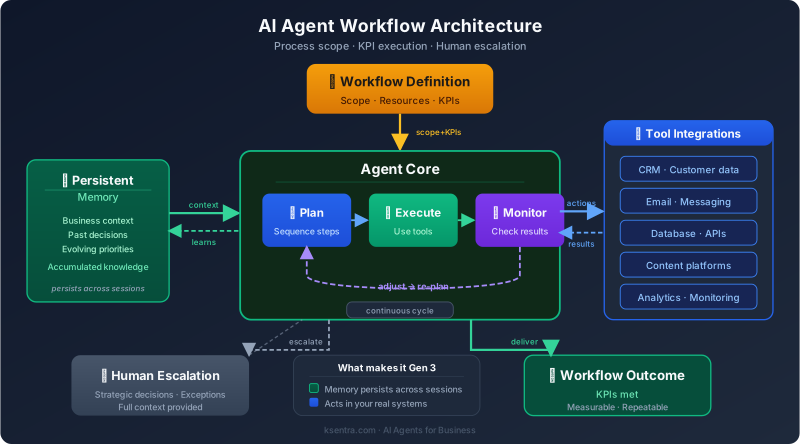
Unlike an AI assistant or chatbot, an agent doesn't wait for instructions at every step. Given a defined worflow, the tools to follow it and KPIs, it executes, monitors results, and escalates anomalies — across sessions, across days.
The agent takes real actions — depending on integration scope: - Writes to your CRM, sends emails, queries your databases - Calls your APIs, generates and publishes content - Monitors metrics and flags anomalies before they become problems
When it hits something outside its authority — a strategic decision, an unusual exception, a quality threshold it can't verify — it escalates with full context, so your team spends 10 minutes on what used to take hours.
One important truth: most production AI agents include human checkpoints — and that's a feature, not a limitation. The goal isn't full automation. It's the right division of labor: AI handles volume and consistency, humans apply judgment and domain expertise where it counts.
Our AI Agent Development Process
Workflow Audit
— 1–2 weeksWe map the target workflow end-to-end: inputs, steps, decisions, outputs, quality criteria. We identify which steps are rule-based (automate fully), which are judgment-based (human in loop), and which are threshold-based (automate with alert).
Architecture Design
— 1 weekWe design the memory model, tool integrations, and goal structure. You review and approve before build begins — no surprises in the implementation.
Build & Integration
— 2–4 weeksWe develop the agent, integrate with your systems, and build the monitoring layer. Timeline depends on the number of tool integrations and workflow complexity.
Supervised Testing
— 1–2 weeksWe run the agent on real work alongside your team. We measure output quality against your criteria, tune behavior, and document edge cases before releasing to autonomous operation.
Autonomous Operation + Ongoing Support
We hand off with documentation, escalation rules, and a feedback mechanism. Optional: Ksentra operates the agent as a managed service — you receive outcomes, we maintain the system.
Proven in Production: Ksentra AI SEO Agent
The strongest proof we can offer is the system running this very website.
The workflow: Full SEO content pipeline — keyword research, competitor analysis, content strategy, article writing, multi-critic quality review, revision, and social media distribution. The agent produces 20+ articles per month on this production pipeline.
What makes it Gen 3: - Persistent memory across 20+ sessions of accumulated context about the business, its audience, keyword gaps, and content performance - Tool use across web search, content audit scripts, analytics data, and CMS publishing - Process-level execution: the agent receives a content calendar and monthly KPIs as input, executes the full publishing workflow within those boundaries, and escalates strategic decisions to the human layer
What humans still do: Collect Webmaster and Search Console reports, publish in the CMS, and make strategic decisions on pivots. These aren't automation gaps — they're the human expertise layer that ensures quality.
We've deployed AI agents for business workflows in content operations, customer service triage, and lead qualification environments — the architecture pattern is consistent across domains.
This is what a real Gen 3 system looks like: autonomous workflow execution with human oversight at the points that matter. Read the methodology behind this project →
Frequently Asked Questions
What's the difference between an AI agent and an AI chatbot?
A chatbot (Gen 2) operates at dialog depth: the human steers, the AI refines within a conversation. An AI agent (Gen 3) operates at process depth: given a defined scope and KPIs, it executes a complete workflow autonomously — across sessions, across days — without step-by-step instruction. The difference isn't a feature list. It's the depth of integration into your business processes.
Do I need a chatbot first, or can I start with an agent?
You can start with an agent if your use case is workflow execution rather than customer conversation. Most Gen 3 agents run on Gen 1 (AI Platform) infrastructure as their foundation — the agent needs a configured knowledge base and LLM layer before it can act on your business context. We'll recommend the right starting point in a consultation — book a free call.
What workflows can an AI agent handle?
Any high-volume, repeatable workflow with defined inputs, steps, and quality criteria is a candidate: content operations (research → write → review → publish), customer support triage (classify → research → respond → escalate), lead qualification (source → score → enrich → sequence), booking management, reporting, and more. The constraint isn't the AI — it's the clarity of the workflow definition.
How much human oversight do I need to maintain?
As much or as little as the workflow warrants. For high-stakes decisions, we design explicit escalation points. For volume tasks with clear quality criteria, the agent runs autonomously with periodic spot-checks. We help you define the right oversight model during the workflow audit — before build begins.
What does an AI agent project cost?
Setup: $5,000–$20,000 depending on workflow complexity and number of integrations. Ongoing: outcome-based pricing (per resolved ticket, per published article, per qualified lead) or a monthly retainer of $1,500–$5,000+. Every project starts with a free consultation and a fixed estimate — no commitment.
Is Gen 3 the right level for my business, or do I need something simpler?
If your team spends significant time on repetitive, rule-following work — and that work is costing you hours per person per week — Gen 3 is worth scoping. If the bottleneck is answering questions or handling customer conversations, start with AI Assistants (Gen 2) or AI Chatbots (Gen 2). We'll be honest about which generation fits. We profit equally from all five — the right fit is what matters.
What happens if the agent makes a mistake?
Every production agent includes monitoring and escalation rules. When output falls below a quality threshold, the agent escalates to a human with full context rather than proceeding. During supervised launch, we tune these thresholds against your real work before releasing to autonomous operation. We don't release any AI agent for business to autonomous operation without a validated quality baseline first.